Construction workflow automation fails when it’s one-way: documents get generated, then die in someone’s downloads folder instead of returning to the system of record.
Real construction workflow automation requires a Return Loop: outputs must publish back into your CRM, project management tools, and storage with version identity and an audit trail—so teams can find the current truth, reconcile changes, and stop reinventing documentation job to job.
Book a 30-minute Return Loop pilot scoping call → (Meet our Enterprise Integration Team)
Who this is for
Best for: operators, PM leadership, estimating leadership, carriers/TPAs, and product/engineering teams
Use when: documentation exists but isn’t governed, discoverable, or reconcilable across tools
Executive summary (one screen)
Problem:
- one-way automation produces orphan documents
Fix:
- publish outputs back into systems of record with identity + manifests
Outcome:
- coherent job files, faster approvals, fewer disputes, better auditability
Construction workflow automation for systems of record
Most teams already have “systems,” but the job record is fragmented:
- CRM notes in one place
- estimates elsewhere
- photos in storage
- change orders in email
- closeout documents scattered across attachments
Even if an AI tool generates “good docs,” the system fails because:
- no one knows which version is current
- approvals aren’t tied to a version
- evidence is detached from claims
- teams can’t answer “what changed and why” quickly
This is not a content problem. It’s a systems problem.
What is a system of record in construction?
A system of record is the toolset your org relies on as authoritative for the job:
- CRM (opportunity → job)
- PM platform (scope, schedule, comms)
- storage repository (photos, PDFs, closeout)
If outputs don’t land back in these records with identity and context, you don’t have automation—you have output generation.
What is the Return Loop?
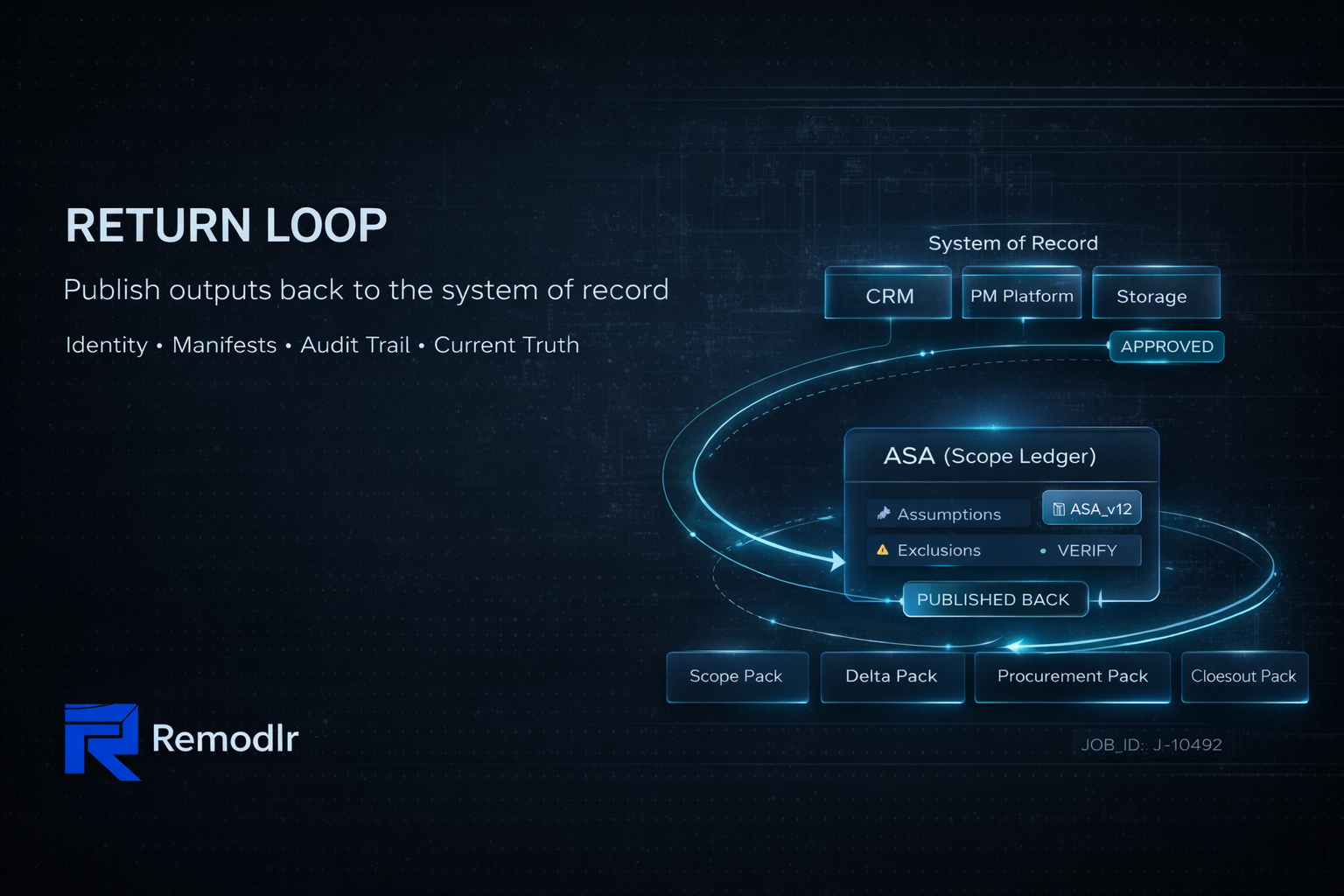
The Return Loop is the mechanism that takes structured scope truth and publishes outputs back into the job record.
In Remodlr terms:
- ASA (scope ledger) is the governed source of truth
- doc packs are outputs (scope, delta, procurement, closeout, checklists)
- the Return Loop writes those outputs back into the system of record with:
- ASA version identity
- output manifest (what was generated from what)
- evidence index links
- timestamps and attribution
- approval status and audit trail
That’s how documentation becomes operational infrastructure.
How the Return Loop works (simple flow)
- Trigger event in system of record
Examples:
- job moves to “Estimate Ready”
- estimate revision created
- new photo set uploaded
- change request logged
- inspection note added
- Ingest inputs and normalize
Photos, PDFs, notes, estimate lines are ingested and mapped to structured fields. - Generate/Update ASA (scope ledger)
ASA is created or revised with explicit assumptions, exclusions, and VERIFY flags. - Enforce constraints (publish gate)
If required fields are missing, publish is blocked and a verification checklist is produced. - Render doc packs from ASA
Examples:
- bid-ready scope
- supplement/change order delta pack
- procurement pack
- closeout/turnover pack
- Publish back (Return Loop)
Outputs are written back into CRM/PM/storage:
- attached to the correct job record
- named consistently
- linked to ASA version + manifest
- audit logged
Minimum data contract (what must be written back)
Enterprise automation needs a simple metadata contract so every artifact is discoverable and governable:
- job_id
- asa_version_id
- doc_pack_type (scope / delta / procurement / closeout / checklist)
- output_manifest_id
- created_at
- created_by (role/user)
- approval_status (draft / submitted / approved / rejected)
- evidence_index_link (if applicable)
- source_inputs (pointers to estimate/photos/docs)
Without this, “automation” produces files that can’t be trusted or reconciled.
Governance and auditability (what enterprise buyers require)
A real Return Loop includes:
- role-based publishing (who can generate/publish)
- approvals tied to ASA versions (who approved what, when)
- retention policy (what is stored, for how long, where)
This is how you avoid “final_v7.pdf” workflows and preserve accountability.
The enterprise value (what the Return Loop unlocks)
- single source of truth without tool rip-and-replace
- consistent outputs across PMs/estimators/regions
- faster approvals (evidence + versioning are visible)
- reduced disputes (changes are computable, not narrative)
- faster closeout (proof stacking is standardized)
- audit trail for governance and compliance
Common failure modes (anti-patterns to eliminate)
- outputs posted as unlinked attachments with generic names
- “final_v7.pdf” versioning
- no manifest tying outputs to inputs
- approvals in email/Slack with no version reference
- photos not tied to scope lines
- multiple “sources of truth” across teams
If any of these are true, your job record is not governable.
FAQs
How do you automate construction documentation?
You automate triggers inside systems of record, generate governed artifacts from structured scope, and publish outputs back with identity, manifests, and audit logs.
Why is one-way document generation not automation?
Because it doesn’t update the job record. Teams still hunt for the current version, approvals, and evidence.
What makes the Return Loop different?
It closes the loop: publishes structured, versioned outputs back into CRM/PM/storage with manifests and auditability, so the job file stays coherent.
Next step
If you want to operationalize documentation across your organization, start with a Return Loop pilot: one workflow, one trigger, one doc pack family, published back into the system of record with identity and audit logs.
Book a 30-minute Return Loop pilot scoping call → (Meet our Enterprise Integration Team)
Safety note
Remodlr provides documentation and workflow automation support only. Permit/inspection requirements vary by jurisdiction—verify with the AHJ. Use licensed professionals for regulated work (electrical, plumbing, gas, structural, fire/life safety).